Carnets - Jupyter (with scipy)1.9.1
Publisher Description


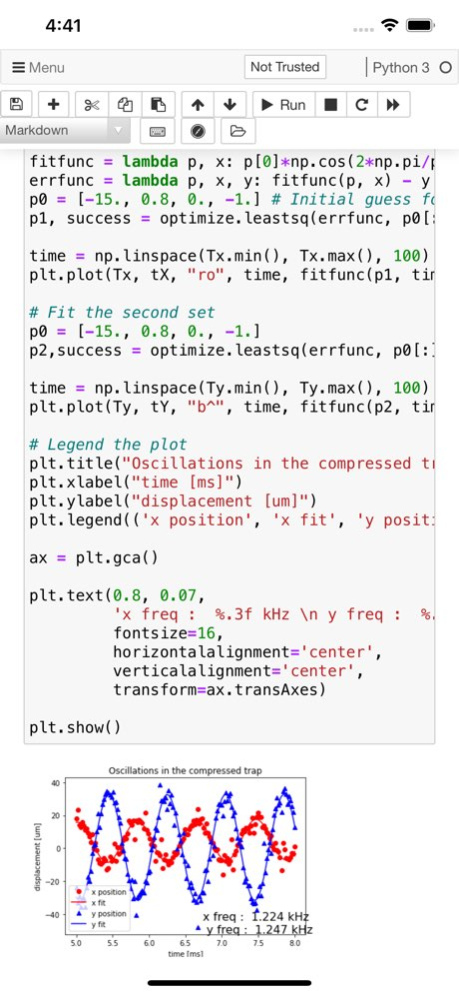
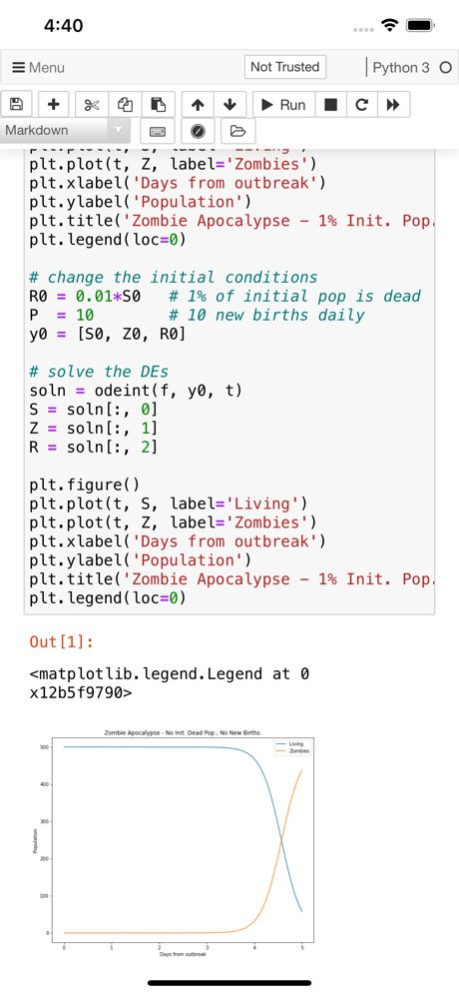
Jupyter notebooks are a powerful tool used in education and research. You can write small snippets of Python code and observe the result on screen, combine with paragraphs of text, using Markdown.
Carnets provides a complete, stand-alone, implementation of Jupyter notebooks. Everything runs on your device, using the embedded Python interpreter; you do not need an internet connection. Compared to the standard version (Carnets), this app adds several packages targeted for scientific computation and learning: scipy, sklearn, seaborn and coremltools. You can switch between standard notebooks and the more modern jupyterlab using the Settings app.
Of course, all the packages included with the standard app are present too: numpy, simply, matplotlib... To see the full list of installed packages, type "%pip list" in a code window. You can add more packages using "%pip install packageName", but only if they are pure Python.
You can share your notebooks with other apps and also open notebooks or directories managed by other apps.
Partial list of installed packages: astropy, babel, bokeh, cartopy, cryptography, cvxopt, Fiona, geopandas, geopy, gym, inequality, libpysal, lxml, mapclassify, matplotlib, networkx, nltk, numpy, openCV, pandas, parso, pillow, pyFFTW, pyproj, qutip, rasterio, regex, Rtree, scikit-learn, scipy, seaborn, segregation, shapely, soupsieve, spopt, statsmodels, sympy, wordcloud.
Version History - bug fix for entering brackets on non-US keyboards
- bug fixes for _ctypes and kiwisolver 1.9.1 11/26/2025 - Reduced battery and CPU consumption; this should fix the overheating issues.
- Updated Python to version 3.13
- updated all major packages (including scipy and scikit-learn) to their latest version.
- better user interface on small devices (iPhones, or small windows on iPads)
- multiple bug fixes. 1.9.0 11/04/2025 Do not show an alert about iCloud access if the user does not have an iCloud account. 1.8.4 08/03/2024 - fixed a major issue with iCloud drive. 1.8.3 03/10/2024 - fixed issues with Matplotlib
- fixed issues with iCloud access
- fixed issue with "File -> New"
- makes sure notebooks are saved when you go back to the file browser.
- fixed issue with CoreMLTools 1.8.1 02/08/2024 - Updated to Notebooks v7: better user interface, more translations, better stability, fewer issues.
- Updated packages to their latest version.
- New "home" button : gets you straight back to the file browser. 1.8.0 10/31/2023 - new module: lzma
- new keyboard shortcuts for forward one page / backward one page (shift-command-[ / shift-command-]) 1.7.9 05/15/2023 - Carnets now works with plotly
- fixed an issue with Dark mode and Notebooks or NbClassic
- fixed an issue with qutip 1.7.7 04/05/2023 - fixes issues with on-screen user interaction
- updated Python version to 3.11
- updated packages to their latest version
- fixed several issues with "Download as..."
- fixed issues with Matplotlib and fonts
- Notebook and NbClassic now share the same JavaScript code
- Many bug fixes, including a bug introduced with 1.7.4 and Pandas. 1.7.6 12/11/2022 - updated Python version to 3.11
- updated packages to their latest version
- fixed several issues with "Download as..."
- fixed issues with Matplotlib and fonts
- Notebook and NbClassic now share the same JavaScript code
- Many bug fixes 1.7.5 12/10/2022 - new module: cartopy
- changed things internally to that "!pip install sunpy" works
- updated packages to their most recent version. This solves the issue with .describe() in pandas.
- numpy 1.24, matplotlib 3.5.2, pandas 1.4.2, astropy 5.1... 1.7.2 07/01/2022 - better contrast for the toolbar at the bottom when using external keyboard
- better information when using virtual environments
- bug fix for "download file" in notebook and nbclassic
- always reset jupyterlab, to avoid issues
- updated jupyter-server
- several fixes to make Carnets more robust 1.7.1 04/11/2022 - better at opening files in other apps directories, with explicit warning if Carnets does not have access to the directory.
- you can chose your notebook style: classical notebook, nbclassic or retrolab (soon to be notebook v7). Pick the style you want using the Settings app, it will be active at the next app restart.
- retrolab is better for small screens, has more translations available and lets you chose dark or light theme independently of the iOS dark or light mode.
- from retrolab, you can switch to jupyterlab if you want. Jupyterlab works better if you have an external mouse and a large screen.
- fixes a bug with virtual environments. 1.7.0 03/22/2022 - fixes an issue with virtual environments 1.6.6 02/19/2022 - fixes a bug with virtual environments activation 1.6.5 02/17/2022 - fixes a bug with "%pip install" that affected some pure Python packages. 1.6.4 02/16/2022 - virtual environments for Python. Create with "!python -m venv newEnvironment", activate with "%run newEnvironment/bin/activate.py", deactivate with "%run newEnvironment/bin/deactivate.py". Virtual environments are limited to user-installed packages.
- added ffmpeg as an external command, for use with OpenCV.
- Command + return on external keyboards now executes the current cell without moving the insertion point (as opposed to Option + return, which executes the current cell and create a new cell below).
- fixed a bug with networkx 1.6.3 02/06/2022 - fixed a bug with astropy
- updated Python version to 3.9.8
- improved file management, display an alert when we can't save a file
- updated packages to their latest version: matplotlib 3.4.0, numpy 1.22, pandas 1.3.4, astropy 5.0... 1.6.2 12/10/2021 - Fixes the bug with external keyboards on iOS 15
- adds several keyboard shortcuts
- new python modules: OpenCV, geopandas, shapely, mapclassify, statsmodels, pysal (except giddy and splot)...
- multiple bugs fixed. 1.6.1 11/04/2021 - new modules: cvxopt, nltk, regex, wordcloud, qutip, pyFFTW.
- fixed an issue with coremltools. 1.5.8 05/24/2021 1.5.7 05/03/2021
About Carnets - Jupyter (with scipy)
The company that develops Carnets - Jupyter (with scipy) is Nicolas Holzschuch. The latest version released by its developer is 1.9.1. This app was rated by 1 users of our site and has an average rating of 5.0.
To install Carnets - Jupyter (with scipy) on your iOS device, just click the green Continue To App button above to start the installation process. The app is listed on our website since 2026-10-15 and was downloaded 223 times. We have already checked if the download link is safe, however for your own protection we recommend that you scan the downloaded app with your antivirus. Your antivirus may detect the Carnets - Jupyter (with scipy) as malware if the download link is broken.
How to install Carnets - Jupyter (with scipy) on your iOS device:
- Click on the Continue To App button on our website. This will redirect you to the App Store.
- Once the Carnets - Jupyter (with scipy) is shown in the iTunes listing of your iOS device, you can start its download and installation. Tap on the GET button to the right of the app to start downloading it.
- If you are not logged-in the iOS appstore app, you'll be prompted for your your Apple ID and/or password.
- After Carnets - Jupyter (with scipy) is downloaded, you'll see an INSTALL button to the right. Tap on it to start the actual installation of the iOS app.
- Once installation is finished you can tap on the OPEN button to start it. Its icon will also be added to your device home screen.
Program Details
System requirements
Download information
Pricing
Version History
version 1.9.1
posted on 2026-10-15
Version History - bug fix for entering brackets on non-US keyboards
- bug fixes for _ctypes and kiwisolver 1.9.1 11/26/2025 - Reduced battery and CPU consumption; this should fix the overheating issues.
- Updated Python to version 3.13
- updated all major packages (including scipy and scikit-learn) to their latest version.
- better user interface on small devices (iPhones, or small windows on iPads)
- multiple bug fixes. 1.9.0 11/04/2025 Do not show an alert about iCloud access if the user does not have an iCloud account. 1.8.4 08/03/2024 - fixed a major issue with iCloud drive. 1.8.3 03/10/2024 - fixed issues with Matplotlib
- fixed issues with iCloud access
- fixed issue with "File -> New"
- makes sure notebooks are saved when you go back to the file browser.
- fixed issue with CoreMLTools 1.8.1 02/08/2024 - Updated to Notebooks v7: better user interface, more translations, better stability, fewer issues.
- Updated packages to their latest version.
- New "home" button : gets you straight back to the file browser. 1.8.0 10/31/2023 - new module: lzma
- new keyboard shortcuts for forward one page / backward one page (shift-command-[ / shift-command-]) 1.7.9 05/15/2023 - Carnets now works with plotly
- fixed an issue with Dark mode and Notebooks or NbClassic
- fixed an issue with qutip 1.7.7 04/05/2023 - fixes issues with on-screen user interaction
- updated Python version to 3.11
- updated packages to their latest version
- fixed several issues with "Download as..."
- fixed issues with Matplotlib and fonts
- Notebook and NbClassic now share the same JavaScript code
- Many bug fixes, including a bug introduced with 1.7.4 and Pandas. 1.7.6 12/11/2022 - updated Python version to 3.11
- updated packages to their latest version
- fixed several issues with "Download as..."
- fixed issues with Matplotlib and fonts
- Notebook and NbClassic now share the same JavaScript code
- Many bug fixes 1.7.5 12/10/2022 - new module: cartopy
- changed things internally to that "!pip install sunpy" works
- updated packages to their most recent version. This solves the issue with .describe() in pandas.
- numpy 1.24, matplotlib 3.5.2, pandas 1.4.2, astropy 5.1... 1.7.2 07/01/2022 - better contrast for the toolbar at the bottom when using external keyboard
- better information when using virtual environments
- bug fix for "download file" in notebook and nbclassic
- always reset jupyterlab, to avoid issues
- updated jupyter-server
- several fixes to make Carnets more robust 1.7.1 04/11/2022 - better at opening files in other apps directories, with explicit warning if Carnets does not have access to the directory.
- you can chose your notebook style: classical notebook, nbclassic or retrolab (soon to be notebook v7). Pick the style you want using the Settings app, it will be active at the next app restart.
- retrolab is better for small screens, has more translations available and lets you chose dark or light theme independently of the iOS dark or light mode.
- from retrolab, you can switch to jupyterlab if you want. Jupyterlab works better if you have an external mouse and a large screen.
- fixes a bug with virtual environments. 1.7.0 03/22/2022 - fixes an issue with virtual environments 1.6.6 02/19/2022 - fixes a bug with virtual environments activation 1.6.5 02/17/2022 - fixes a bug with "%pip install" that affected some pure Python packages. 1.6.4 02/16/2022 - virtual environments for Python. Create with "!python -m venv newEnvironment", activate with "%run newEnvironment/bin/activate.py", deactivate with "%run newEnvironment/bin/deactivate.py". Virtual environments are limited to user-installed packages.
- added ffmpeg as an external command, for use with OpenCV.
- Command + return on external keyboards now executes the current cell without moving the insertion point (as opposed to Option + return, which executes the current cell and create a new cell below).
- fixed a bug with networkx 1.6.3 02/06/2022 - fixed a bug with astropy
- updated Python version to 3.9.8
- improved file management, display an alert when we can't save a file
- updated packages to their latest version: matplotlib 3.4.0, numpy 1.22, pandas 1.3.4, astropy 5.0... 1.6.2 12/10/2021 - Fixes the bug with external keyboards on iOS 15
- adds several keyboard shortcuts
- new python modules: OpenCV, geopandas, shapely, mapclassify, statsmodels, pysal (except giddy and splot)...
- multiple bugs fixed. 1.6.1 11/04/2021 - new modules: cvxopt, nltk, regex, wordcloud, qutip, pyFFTW.
- fixed an issue with coremltools. 1.5.8 05/24/2021 1.5.7 05/03/2021
version 1.9.1
posted on 2025-11-26
- bug fix for entering brackets on non-US keyboards
- bug fixes for _ctypes and kiwisolver
version 1.8.4
posted on 2024-08-03
Aug 3, 2024
Version 1.8.4
Do not show an alert about iCloud access if the user does not have an iCloud account.
version 1.8.3
posted on 2024-03-10
Mar 10, 2024
Version 1.8.3
- fixed a major issue with iCloud drive.
version 1.8.1
posted on 2024-02-08
Feb 8, 2024
Version 1.8.1
- fixed issues with Matplotlib
- fixed issues with iCloud access
- fixed issue with "File -> New"
- makes sure notebooks are saved when you go back to the file browser.
- fixed issue with CoreMLTools
version 1.8.0
posted on 2023-10-31
Oct 31, 2023
Version 1.8.0
- Updated to Notebooks v7: better user interface, more translations, better stability, fewer issues.
- Updated packages to their latest version.
- New "home" button : gets you straight back to the file browser.
version 1.7.9
posted on 2023-05-15
May 15, 2023
Version 1.7.9
- new module: lzma
- new keyboard shortcuts for forward one page / backward one page (shift-command-[ / shift-command-])
version 1.7.7
posted on 2023-04-05
Apr 5, 2023
Version 1.7.7
- Carnets now works with plotly
- fixed an issue with Dark mode and Notebooks or NbClassic
- fixed an issue with qutip
version 1.7.6
posted on 2022-12-11
Dec 11, 2022
Version 1.7.6
- fixes issues with on-screen user interaction
- updated Python version to 3.11
- updated packages to their latest version
- fixed several issues with "Download as..."
- fixed issues with Matplotlib and fonts
- Notebook and NbClassic now share the same JavaScript code
- Many bug fixes, including a bug introduced with 1.7.4 and Pandas.
version 1.7.2
posted on 2022-07-01
Jul 1, 2022 Version 1.7.2
- new module: cartopy
- changed things internally to that "!pip install sunpy" works
- updated packages to their most recent version. This solves the issue with .describe() in pandas.
- numpy 1.24, matplotlib 3.5.2, pandas 1.4.2, astropy 5.1...
